Turn monitoring data into a report clients actually read
DownCTL turns uptime, incidents, renewals, and performance into a plain-language report for a site, a client, or your whole portfolio — scheduled to send itself, with a team note attached.
No credit card required during the trial period.
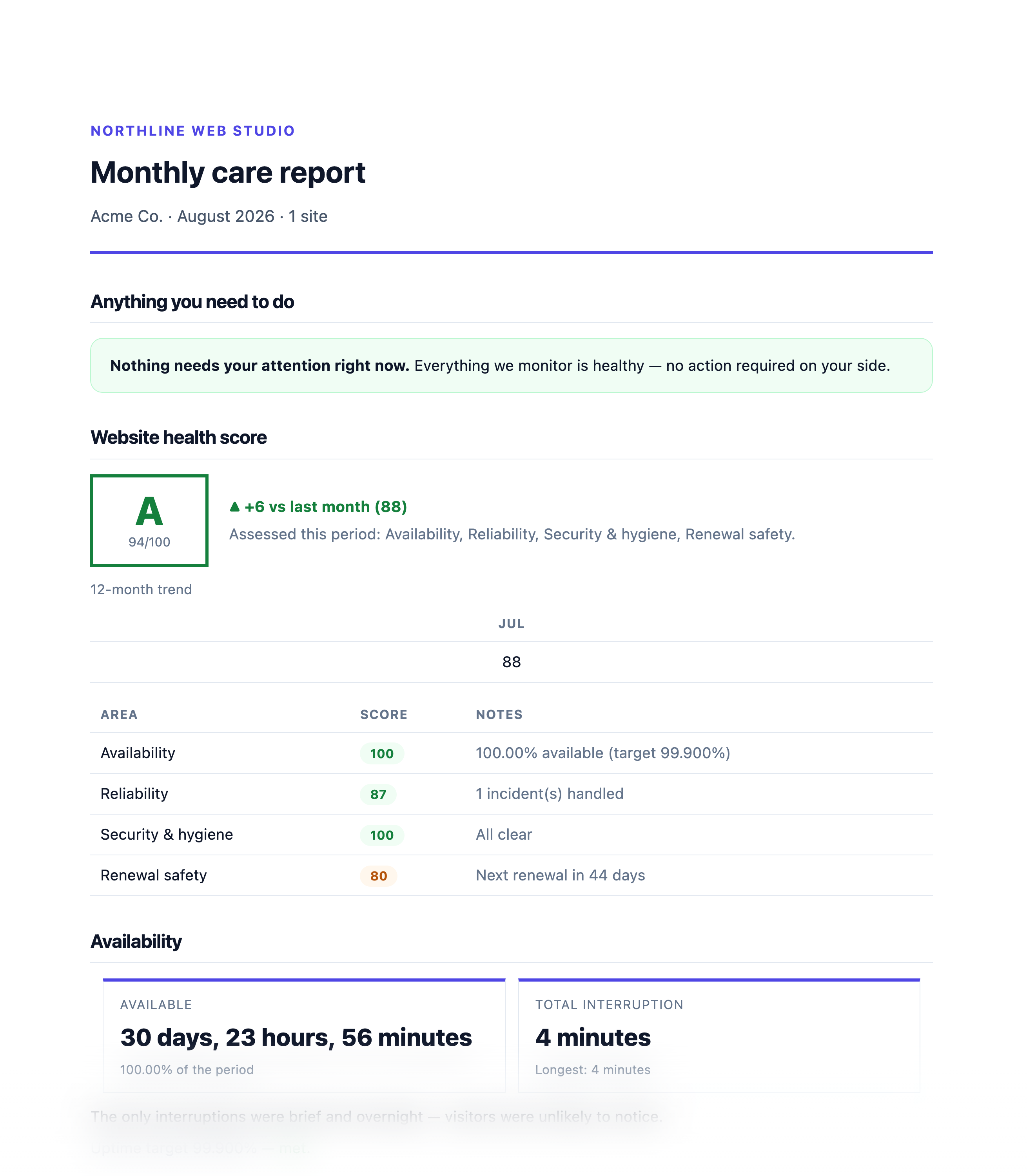
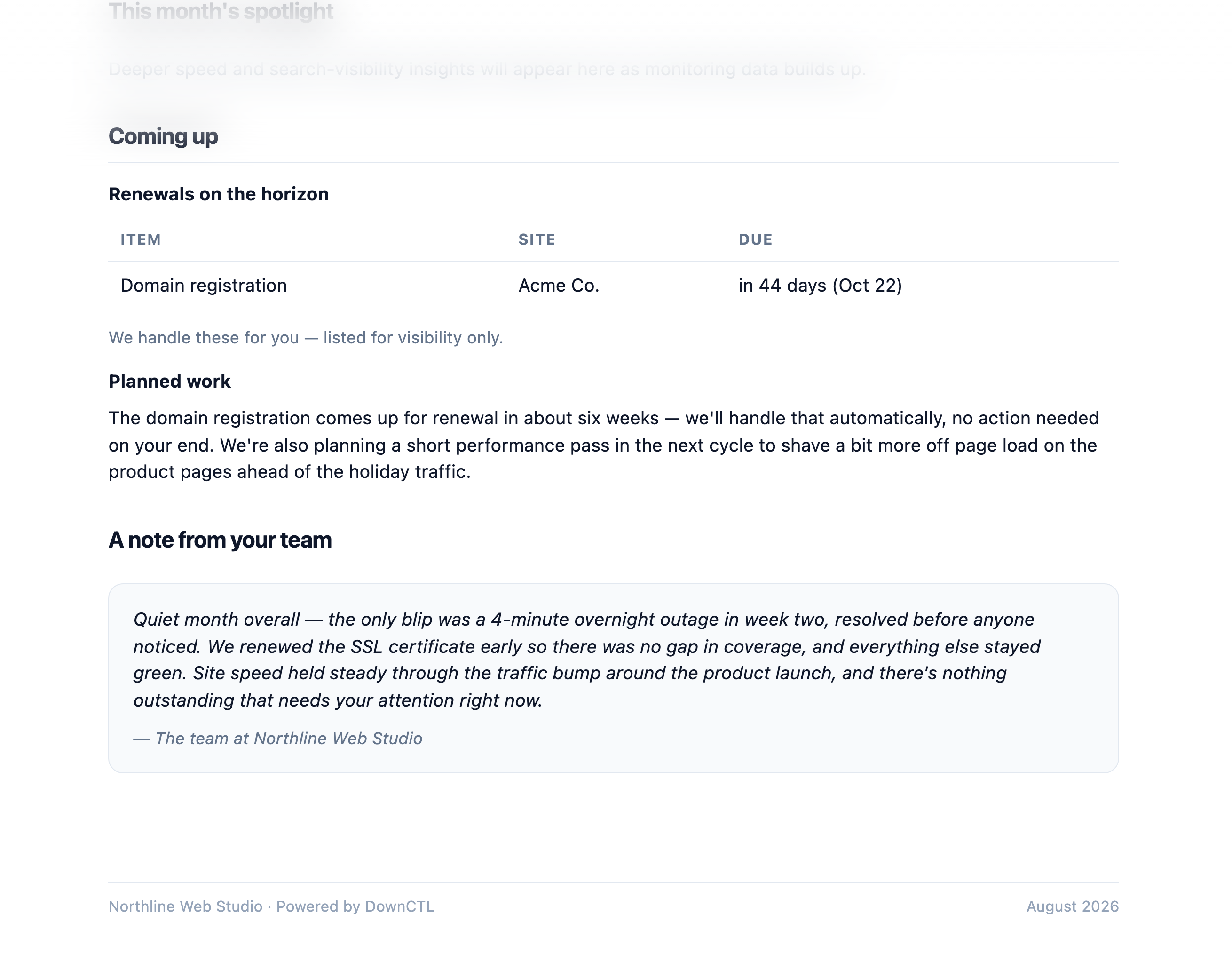
What DownCTL reports include
DownCTL brings this monitoring signal into the same workflow as uptime, alerts, incidents, and status communication.
A 0-100 health grade built from uptime, security, renewals, and performance
Client-facing presets: monthly care report, executive summary, portfolio health
Detailed presets for uptime, incident, renewal, and performance history
A team note for what was handled and what's coming next
Recurring delivery to To/CC/BCC recipients on your own cadence
PDF export and an optional public shareable link per report
Why it matters
This feature gives teams clearer operational context and a faster path from detection to response.
Clients cannot see the work behind a quiet month unless you show them
A recurring report replaces a manual monthly write-up
Portfolio, client, and single-site reports serve different audiences from the same data
A note from your team turns metrics into a relationship, not just a chart
How it works in DownCTL
Reports are where every other signal DownCTL tracks — uptime, incidents, renewals, performance — becomes something a client actually reads and trusts.
- 1 Choose a preset for the target — a site, a client, or the whole portfolio
- 2 Set a cadence, owner, and To/CC/BCC recipients on a schedule
- 3 Add a short note on what was handled and what's ahead before it sends
- 4 DownCTL generates the run, emails it, and keeps a PDF and optional share link on file
Keep exploring the website operations stack
DownCTL checks client websites continuously, records response history, and alerts your team when downtime or slow responses need attention.
Turn client-site health into a public source of truth with branded status pages, incident timelines, uptime summaries, and subscriber updates.
Create reusable channels and route each client-site alert rule to the people and tools that should know first.
DownCTL lets you schedule a maintenance window for any site, then handles the advance notices, start and completion updates, and subscriber emails automatically.
Common questions
What goes into a client report?
Depending on the preset: a health grade, an uptime and incident recap, renewal status, performance trends, and a team note — client-facing presets keep the language plain, detailed presets go technical.
Can reports be scheduled to send automatically?
Yes. Each report has one or more schedules with their own cadence, send time, and recipients, and DownCTL generates and delivers the run automatically.
Can I add my own commentary?
Yes. Team notes let you add what was handled and what's coming next before a report sends, and can be marked ready so the next send goes out as-is.
Do clients need a login to see a report?
No. Every report run can be exported as a PDF or opened from a shareable link — publishing that link is a deliberate action per run, not automatic.
Can I report on a single site, a client, or the whole portfolio?
Yes. Reports can target a single site, everything for one client, or a portfolio-wide rollup across every client.
Start monitoring with DownCTL
Start your free trial and bring client-site uptime, website health, alerts, and status pages into one place.
14-day free trial · No credit card required · Cancel anytime